
G2A vs Kinguin vs Eneba: Full Comparison 2026
G2A has the widest catalogue, Kinguin the deepest back catalog and software selection, and Eneba the clearest pricing and cleanest refund process. None is de...
G2A has the widest catalogue, Kinguin the deepest back catalog and software selection, and Eneba the clearest pricing and cleanest refund process. None is decisively safest; they run comparable verification, and your actual outcome depends more on the individual seller you pick than on which of the three logos appears above them.
This comparison covers what genuinely differs between the three: how each handles a faulty key when the seller stops replying, how much the checkout price diverges from the listed price, which catalog suits which kind of purchase, and which platform to pick for a given buying scenario. If you're still deciding whether third-party key marketplaces are worth using at all, start with our guide to whether CD keys are legit and come back.
Disclosure: Cdkeycompares is a free price comparison site and earns commission when readers click through to merchants, including all three platforms below. We don't sell CD keys ourselves, and merchant assessments here reflect the same criteria we apply across every store we list.
G2A vs Kinguin vs Eneba: Quick Comparison Table
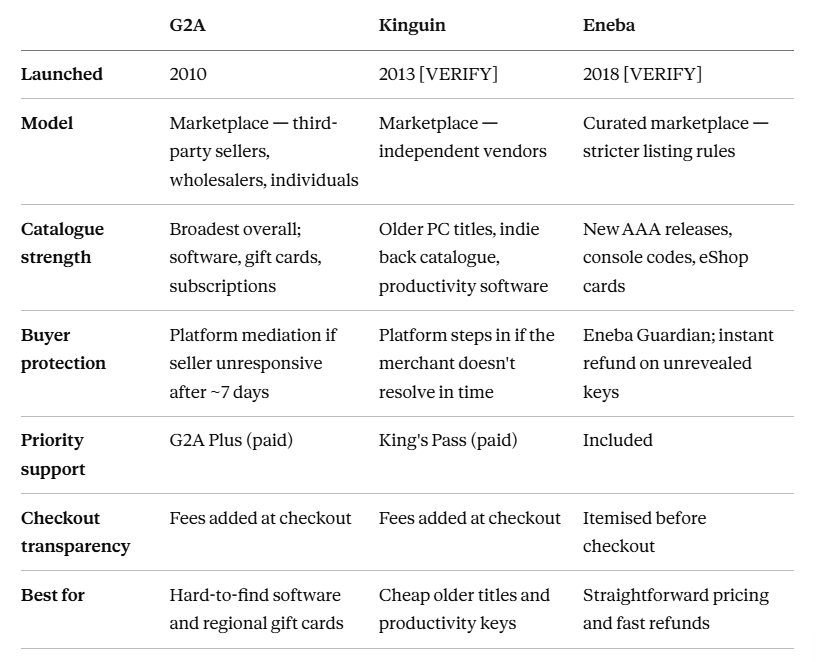
All three are grey-market marketplaces rather than authorised retailers. They list keys sold by third parties, they don't source from publishers themselves. That distinction shapes everything below; our grey market keys guide explains why it matters.
G2A: The Largest CD Key Marketplace
G2A launched in 2010 and is the biggest of the three by inventory and user base, covering games, software licences, gift cards, and streaming subscriptions. Its marketplace hosts wholesalers, small retailers, and individual sellers.
Buyer protection: Seller onboarding checks and automated fraud filtering sit in front of listings, with a ticket system behind them. If a seller doesn't replace a faulty key within roughly seven days, G2A can mediate, but you'll need the order details and a screenshot of the activation error to open the case. G2A Plus, a paid subscription, adds discounts and priority support.
Catalogue Strengths: The strongest reason to choose G2A. If a regional gift card or an obscure software licence exists on any of the three, it's most likely here. For mainstream new releases, the price advantage over the other two is often marginal; for the long tail it's frequently the only option.
Solid Reputation: Mixed, and worth being straight about. G2A’s size means it has the most listings and the most complaints. Third-party review sites show lower ratings than the other two. Complaints often mention invalid keys and slow dispute resolution. Check current G2A's Trustpilot score. The platform has also drawn sustained criticism from developers over key sourcing. Checkout has historically added subscriptions unless you decline them, so read the final basket before paying.
The practical takeaway: G2A's seller ratings vary more widely than the other two platforms', which makes checking the individual seller's score genuinely load-bearing here rather than optional.
Kinguin: The Longest-Standing Marketplace
Operating since 2013, Kinguin is a marketplace where independent vendors list keys across Steam, Xbox, PlayStation, Epic, and Nintendo.
Buyer protection. Kinguin replaced its old optional buyer-protection fee with King's Pass, a premium subscription that puts your ticket at the front of the queue. The platform will step in when a merchant fails to resolve an issue within the stated window.
Catalogue Strengths: Kinguin's edge is depth rather than breadth: older PC titles, niche indie releases, and productivity software often sit well below what the other two ask, because the sellers concentrated there are working through back catalogue rather than competing on launch-day AAA.
Reputation: Reasonable overall, with one consistent complaint: without a paid tier, standard support is slow. The scenario people describe most often is a disputed key. You report it as dead, the seller insists it works, and the back-and-forth runs for days before anyone at Kinguin intervenes.
The trade-off, in plain terms: Kinguin's prices on older titles can beat both competitors, but the effective cost of a problem is higher because the fast route around it is behind a subscription. On a €5 indie game that's an acceptable gamble. On a €60 software licence it's worth pricing in.
Eneba: the Cleaner UI & Transparent Checkout
Eneba is the newest of the three and grew quickly on aggressive pricing and a markedly cleaner buying experience. Its listing rules are stricter, resulting in a more curated marketplace than G2A's open marketplace.
Buyer protection: Eneba Guardian covers disputes, and the refund policy draws a line most buyers find intuitive. If you haven't revealed the license code, you can request a refund immediately, no case-building required. Once you view the key, follow the documentation process. Submit a support ticket and include error evidence, like anywhere else.
Catalogue: Strongest on recent AAA releases and console ecosystem products: Xbox codes, Nintendo eShop cards, PlayStation credit. Thinner than the other two on obscure software and the deep PC back catalogue.
Reputation: The best of the three on checkout experience specifically. No subscription prompts inserted into the purchase flow, and fees are itemised before you commit rather than appearing at the final step.
The unreveal window is the real differentiator: It sounds minor and is not on the other two platforms. If you buy the wrong region or edition and catch it fast, you still need a support ticket. On Eneba it doesn't. That single policy removes the most common buyer mistake from the dispute process entirely.
Buyer Protection Compared Across Platforms
Catalogues tell you where to find a key. What follows tells you what happens when that key doesn't work, which is the part most buyers only think about too late.
The scenario is always the same: the code is already redeemed, or it's locked to a region you're not in. What differs is how much work falls on you.
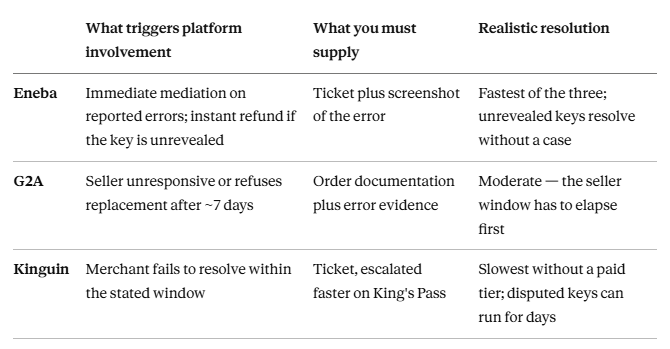
The pattern worth noticing: all three ultimately mediate. What you're really choosing between is how long you wait and how much evidence you assemble before anyone does. Whichever you use, take a screenshot of the activation error before doing anything else. Every one of these processes needs it, and it's much harder to reproduce after you've closed the window. Our key doesn't work page covers the recovery steps in order.
Fees and final pricing
Protection determines what a bad purchase costs you. Fees determine what a good one does and on all three platforms, the number you first see is not the number you pay.
Service charges and payment processing are added during checkout, so the listed price is a starting figure rather than a total.
G2A and Kinguin both add platform commission and payment fees at the checkout stage. The gap between listed and final price is where most of the "why did this cost more than advertised" complaints originate.
Eneba charges a service fee too, but itemises it before you commit, so the final figure is visible earlier in the flow.
The practical consequence is that cross-platform price comparison on listed prices alone is unreliable. A key that looks cheapest on one platform can finish more expensive than a rival listing once fees land, which is exactly why our comparison tool accounts for processing fees and live stock levels rather than scraping headline prices.
Which one should you choose?
The honest summary of the trade-offs: G2A buys you the widest selection at the cost of the most variable seller quality. Kinguin buys you the cheapest back catalogue at the cost of slower support unless you pay for it. Eneba buys you the cleanest process and clearest pricing at the cost of a narrower catalogue.
Mapped to actual purchases:
Choose G2A when you need something specific and hard to find, a regional gift card, an unusual software licence, or an older subscription product. The catalogue is the reason to be there, and it's a good one. Check the individual seller's rating before you buy; the variance between sellers here is wider than on the other two.
Choose Kinguin for older PC titles, indie back catalogue, and productivity software, where its pricing is genuinely hard to beat. Best suited to lower-value purchases, where a slow support queue is an annoyance rather than a real cost.
Choose Eneba when you want the purchase to be uncomplicated: fees visible before you commit, no subscription prompts in the checkout, and an instant refund if you catch a mistake before revealing the code. It’s the one to use for higher-value purchases. The refund process is usually the fastest. You pay for a smaller catalog, but you get easier recovery if something goes wrong.
If you're not sure: compare the specific title you want across all three rather than picking a platform first. Prices for the same key diverge substantially between them, and the cheapest platform changes by product.
FAQs
1. Which is safest - G2A, Kinguin, or Eneba?
No single one is clearly safest. All three verify sellers and mediate disputes, and all three are grey-market marketplaces where the key's origin matters more than the platform's logo. Eneba's unrevealed-key refund makes recovery from a mistake easiest; G2A's larger seller pool means more variance between individual sellers.
2. Why do prices differ for the same game across these three sites?
Each is an independent marketplace where sellers set their own prices, so listings reflect the seller's sourcing cost, regional pricing differences, and each platform's commission rate. Checkout fees then vary too, which is why the cheapest listed price isn't always the cheapest final price.
3. Can I get a refund if a key doesn't work?
All three offer a route, but it isn't automatic. You'll need to open a dispute and provide evidence; usually a screenshot of the activation error. Eneba refunds unrevealed keys without a case; G2A and Kinguin both require the seller window to elapse first.
4. Are these platforms legal to buy from?
Buying from them is generally not a criminal act in most jurisdictions, since the keys are genuine products resold outside authorised channels. It may still breach a gaming platform's terms of service. See our guide on whether cheap game keys are legal for the details.
5. Should I check the individual seller or just trust the platform?
Check the seller. On all three, you're buying from a third party, and seller ratings vary considerably within each marketplace. A high-rated seller on any of the three is a better bet than a low-rated seller on the one with the best overall reputation.
6. Does Cdkeycompares include prices from all three?
Yes. We pull live pricing from all three plus other digital key retailers, and account for stock levels and payment processing fees so the figure shown reflects what you'd actually pay.
Final thoughts
These three cover most of the third-party CD key market between them, and the differences that matter aren't the ones the marketing emphasises. Catalogue breadth affects where you can find a key. Refund policy and support speed affect what a mistake costs. Checkout fees affect whether the price you compared was real.
For most buyers, the sensible approach is not loyalty to one platform but comparing the specific product across all three, then checking the individual seller's rating before paying, because that's the variable with the largest effect on your outcome.